Author: NCCC Online Learning

NCCC Goes Mobile with ANGEL

Hand holding mobile device

A mobile app (Blackboard Mobile Learn) is now available for ANGEL users at NCCC.  This new app enables you to access and update much of the core content available in ANGEL from your mobile device.  Faculty members can now post announcements, post to discussion threads, view their course rosters, and more… all from the convenience of their mobile device. This new mobile app is available for the following types of devices:

Resources for Going Mobile

  • Mobile Learning Info Toolkit: A practical guide for using mobile technology for education. The site is an excellent resource for introducing the reader to mobile education and providing strategies for implementation. What is mobile learning?  Explains that this method is about the mobility of the learner rather than the device. Mobile learning myths helps educators to overcome the “fear of the unknown” by exploring the 10 myths surrounding mobile education.

Online Learning Today: What Works, What Doesn’t

The journal Community College Week recently published an article entitled “Online Learning Today: What Works, What Doesn’t.” The author, William Wade, is dean of Online Learning at West Kentucky Community & Technical College, a school that began its online course offerings in 1991 when “the college introduced an English Composition course with an enrollment of 12 students. The course could be taken from home using a virtual bulletin board in a system limited to one login at a time. Students scrolled through course content in a single direction, turned in their papers via e-mail, and received graded papers from the teacher through postal mail. ” Obviously much has changed since then!

This article provides a concise overview on some of the most successful strategies in online education today: consistency, engagement, affordable quality, and mobile options.

Click here to read the full article: Online Learning Today


Assessing Online Learning: Strategies, Challenges and Opportunities


When it comes to online education, one question still persists: “How do I know what my online students have learned?” While there are no simple answers, with a little creativity you will soon discover that the online learning environment opens up a host of new student assessment possibilities. And, just as with traditional courses, the trick is finding the right combination that works best for your particular course.
 

A reader favorite, Assessing Online Learning: Strategies, Challenges and Opportunities features 12 articles that will cause you to examine your current methods of online assessment, and perhaps add something new to your assessment toolbox. The report even covers some of the common assessment mistakes you will want to avoid.

Take a look at a few of the articles contained in the report:

  • Ongoing Student Evaluation Essential to Course Improvement
  • Four Typical Online Learning Assessment Mistakes
  • Strategies for Creating Better Multiple-Choice Tests
  • Using Self-Check Exercises to Assess Online Learning
  • Measuring the Effectiveness of an Online Learning Community

Click here to read the full report.

Horizon Project Short List

NMC Horizon Report > 2012 Higher Ed Edition

The NMC Horizon Report > 2012 Higher Education Edition is a collaborative effort between the NMC and the EDUCAUSE Learning Initiative (ELI), an EDUCAUSE Program.

This ninth edition describes annual findings from the NMC Horizon Project, a decade-long research project designed to identify and describe emerging technologies likely to have an impact on learning, teaching, and creative inquiry in higher education. Six emerging technologies are identified across three adoption horizons over the next one to five years, as well as key trends and challenges expected to continue over the same period, giving campus leaders and practitioners a valuable guide for strategic technology planning.

The 2012 Horizon Project Higher Education Advisory Board initially voted on the top 12 emerging technologies — the result of which is documented in the NMC Horizon Project Short List > 2012 Higher Education Edition. This Short List helped the advisory board narrow down the 12 technologies to six for the full publication.

Click here to access the NMC Horizon Project Short List: 2012 Higher Education Edition

Looking for a simple solution for synchronous discussion in your online course? Try the chat feature in ANGEL!

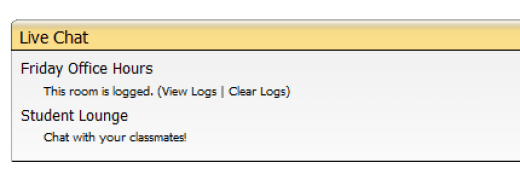
One of the tools available in ANGEL is the Live Chat nugget. As the name implies, this tool is for synchronous conversations, or chats.

Image of chat nugget in ANGELHere any students (or faculty) attached to a course can communicate in real-time. The communications may be logged so that the faculty member or the students can access the discussion. Communication is limited to text only. You can make a session available to all students or set up teams.  You can set up a session as a specific date/ time or you can keep it open throughout the semester.

Here’s a brief video on how to set-up a chat room

A few things to consider when using the chat feature:

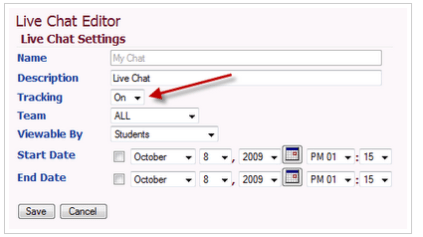
A chat room is like a real room. Whatever was said before you entered is not available to you. All you “hear” (i.e., see on the screen) is what is happening when you are in the room. If you leave the room and come back in, you will no longer see the text that was on the screen when you left. If you want to access the logs and/or have the logs accessible to students you should change the tracking to ON. To do this you will go to the settings in the chat area (pencil icon) and edit settings.

Here is a link to directions that you may provide students for using the chat room.

You can add the document as a link in ANGEL, paste the link in an Announcement, an e-mail, etc. The directions are pretty straightforward as all the students need to do is access the chat through the Communication Tab. Once they click on the chat link the platform will open and they can type, much like instant messaging, which most students are quite familiar with.

For more synchronous discussion options or for assistance with setting up your chat session please contact the department of E-Learning!

10 Principles of Effective Online Teaching: Best Practices in Distance Education

Cover page to Special Report


In the traditional college classroom today, faculty and students arrive with a certain set of
expectations, shaped largely by past experiences. And although students may need the occasional (or perhaps frequent) reminder of what’s required of them, there’s usually something very familiar about the experience for both faculty and students alike.

In the online classroom, an entirely new set of variables enters the equation. It’s a little like trying to drive in a foreign country. You know how to drive, just like you know how to teach, but it sure is hard to get the hang of driving on the left side of the road, you’re not quite sure how far a kilometer is, and darn it if those road signs aren’t all in Japanese.

This special report explains the “rules of the road” for online teaching and learning and features a series of columns that first appeared in the Distance Education  Report’s “Between the Clicks,” a popular column by Dr. Lawrence C. Ragan, Director of Instructional Design and Development for Penn State’s World Campus.

Click here to read the full report

Remind 101: A Free and Easy to Use Tool for Communicating with Students.

Text-messaging is a great way to reach students instantly.  Remind 101 is a free and easy to use tool that allows you to easily send text messages to your students.

Use Remind 101 to send texts to students to remind them of important dues dates, upcoming events, and changes in plans.  This works so well because your students are likely checking texts much more regularly than email.

It is a perfect tool for any faculty member that wants to disseminate information efficiently.

Read these Getting Started Directions and begin communicating via text today!

What is Remind 101? A brief video.

Sign up to use Remind 101 at http://remind101.com/

Head in the Clouds? Ten Free Web 2.0 Tools to Support Faculty Research

Take a look at the following list of Web 2.0 Tools to Support Faculty Research. The list was compiled by Faculty Focus. Click here to read the full article.

Web 2.0 Tool/Link Functionality
BibMe ·Create fast and easy bibliographies
bubbl.us ·Brainstorming made simple
·Visual data
·Flow charts
CiteULike · Easily store references you find online
· Discover new articles and resources
· Automated article recommendations
· Share references with your peers
· Find out who’s reading what you’re reading
· Store and search your PDFs
Confolio · Store files, links, ideas
· Collaborate with others by sharing info
· Publish opinions on contributions of others
Connotea · Save and organize links to your references
· Easily share references with colleagues
· Access references from any computer
Gapminder · Interactive, dynamic data visuals
· Trend analysis
· Statistical analysis
Google Docs · Co-construction and online creation
· Manuscripts, interview transcripts, spreadsheets, presentations, etc
Mendeley · Sharing, building online research libraries
· Collaboration.
Mindmeister · Mindmaps
· Schematic diagrams
Zotero · Bibliographic plugin for organizing research